
JSON Formatting and Validation: A Developer's Complete Guide
JSON is everywhere in modern development. Learn how to format, validate, and debug JSON data like a pro with this comprehensive guide.
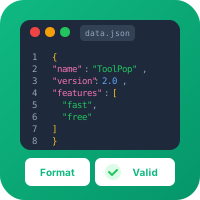
What is JSON?
JSON (JavaScript Object Notation) is a lightweight data interchange format. It's easy for humans to read and write, and easy for machines to parse and generate.
Why JSON?
- Universal support: Works in every programming language
- Human readable: Clear, simple syntax
- Lightweight: Minimal overhead compared to XML
- API standard: The default format for REST APIs
- Configuration files: Used by npm, VS Code, and countless tools
JSON Syntax Basics
Data Types
JSON supports six data types:
{
  "string": "Hello, World!",
  "number": 42,
  "boolean": true,
  "null": null,
  "array": [1, 2, 3],
  "object": {"nested": "value"}
}
Strings
Strings must use double quotes (not single quotes):
✅ {"name": "John"}
❌ {'name': 'John'}
Escape characters:
- \\" - Double quote
- \\\\ - Backslash
- \\n - Newline
- \\t - Tab
- \\r - Carriage return
Numbers
Numbers can be integers or floating-point:
{
  "integer": 42,
  "negative": -17,
  "float": 3.14159,
  "scientific": 1.5e10
}
Not allowed:
- Leading zeros (01, 007)
- Hexadecimal (0xFF)
- Infinity or NaN
Booleans and Null
Lowercase only:
✅ {"active": true, "deleted": false, "nickname": null}
❌ {"active": True, "deleted": FALSE, "nickname": NULL}
Arrays
Arrays are ordered lists enclosed in brackets:
{
  "fruits": ["apple", "banana", "cherry"],
  "mixed": [1, "two", true, null],
  "nested": [[1, 2], [3, 4]]
}
Objects
Objects are key-value pairs enclosed in braces:
{
  "person": {
    "name": "Alice",
    "age": 30,
    "address": {
      "city": "New York",
      "zip": "10001"
    }
  }
}
Common JSON Errors
1. Trailing Commas
JSON does NOT allow trailing commas:
❌ {"a": 1, "b": 2,}
✅ {"a": 1, "b": 2}
2. Single Quotes
Only double quotes are valid:
❌ {'name': 'John'}
✅ {"name": "John"}
3. Unquoted Keys
All keys must be quoted:
❌ {name: "John"}
✅ {"name": "John"}
4. Comments
JSON does NOT support comments:
❌ {"name": "John" /* user's name */}
❌ {"name": "John" // user's name}
✅ {"name": "John", "_comment": "user's name"}
5. Invalid Number Formats
❌ {"value": 01}      // Leading zero
❌ {"value": .5}      // Must start with digit
❌ {"value": 1.}      // Must have digits after decimal
✅ {"value": 0.5}
6. Wrong Boolean/Null Case
❌ {"active": True, "value": Null}
✅ {"active": true, "value": null}
Formatting JSON
Why Format?
Minified JSON saves bandwidth but is hard to read:
{"users":[{"id":1,"name":"Alice","email":"alice@example.com"},{"id":2,"name":"Bob","email":"bob@example.com"}]}Formatted JSON is readable:
{
  "users": [
    {
      "id": 1,
      "name": "Alice",
      "email": "alice@example.com"
    },
    {
      "id": 2,
      "name": "Bob",
      "email": "bob@example.com"
    }
  ]
}
Formatting Options
Indentation:
- 2 spaces (common in JavaScript)
- 4 spaces (common in Python)
- Tabs (less common)
- Alphabetical (easier to compare)
- Original order (preserves intent)
Using ToolPop JSON Formatter
- Paste your JSON
- Click "Format"
- Choose indentation preference
- Copy the formatted result
Validating JSON
Why Validate?
Invalid JSON causes:
- API errors
- Application crashes
- Debugging headaches
- Sending to an API
- Storing in a database
- Using in configuration files
Validation Process
- Syntax check: Is it valid JSON?
- Schema validation: Does it match expected structure?
- Type checking: Are values the correct types?
JSON Schema
For advanced validation, use JSON Schema:
{
  "$schema": "http://json-schema.org/draft-07/schema#",
  "type": "object",
  "required": ["name", "email"],
  "properties": {
    "name": {
      "type": "string",
      "minLength": 1
    },
    "email": {
      "type": "string",
      "format": "email"
    },
    "age": {
      "type": "integer",
      "minimum": 0
    }
  }
}
Working with JSON in Code
JavaScript
// Parse JSON string to object
const data = JSON.parse('{"name": "Alice"}');

// Convert object to JSON string
const json = JSON.stringify(data);

// Pretty print with indentation
const pretty = JSON.stringify(data, null, 2);
Python
import json

# Parse JSON string
data = json.loads('{"name": "Alice"}')

# Convert to JSON string
json_str = json.dumps(data)

# Pretty print
pretty = json.dumps(data, indent=2)
Command Line (jq)
# Format JSON
echo '{"a":1}' | jq .

# Extract value
echo '{"name":"Alice"}' | jq .name

# Filter arrays
echo '[1,2,3,4,5]' | jq '.[] | select(. > 2)'
JSON Best Practices
1. Use Consistent Naming
Choose a convention and stick to it:
- camelCase: {"firstName": "John"} (JavaScript)
- snake_case: {"first_name": "John"} (Python)
- kebab-case: Avoid (hard to use as properties)
2. Keep It Simple
// Too nested
{"data": {"user": {"profile": {"name": {"first": "John"}}}}}

// Better
{"user_first_name": "John"}
3. Use Arrays Correctly
// Don't use numbered keys
❌ {"item0": "a", "item1": "b", "item2": "c"}

// Use an array
✅ {"items": ["a", "b", "c"]}
4. Date Formats
JSON doesn't have a date type. Use ISO 8601 strings:
{"created_at": "2025-03-01T14:30:00Z"}5. Null vs Omit
Be intentional:
// Field explicitly null
{"nickname": null}

// Field omitted (may not exist)
{}
Debugging JSON Issues
Step 1: Validate Syntax
Use ToolPop JSON Validator to check for syntax errors.
Step 2: Check Common Problems
- Trailing commas?
- Missing quotes?
- Wrong quote type?
- Invalid escape sequences?
Step 3: Isolate the Problem
For large JSON:
- Remove half the content
- Validate
- If valid, problem is in removed half
- Repeat until found
Step 4: Use Diff Tools
Compare working vs broken JSON to spot differences.
JSON Security
1. Never eval() JSON
❌ eval('(' + jsonString + ')');
✅ JSON.parse(jsonString);
2. Validate Input
Never trust user-provided JSON. Validate against a schema.
3. Sanitize Output
When embedding JSON in HTML, escape properly to prevent XSS.
Conclusion
JSON is fundamental to modern web development. Understanding its syntax, knowing common errors, and using proper tools for formatting and validation will save you countless debugging hours.
Use ToolPop's free JSON Formatter and Validator to work with JSON more efficiently. Whether you're debugging an API response or crafting a configuration file, proper JSON handling is essential.

Try Our Free Tools
Put these tips into practice with our free online tools. No signup required.
Explore Tools